
Manual Engagement
Manual Engagement allows you to purchase engagement for a specific X post.
Unlike Auto-Delivery, which can apply your selected engagement settings to future posts, Manual Engagement is used when you already have a particular post you want to promote.
Step 1: Choose Manual Engagement
Section titled “Step 1: Choose Manual Engagement”From your FMAX Dashboard, select the option to purchase engagement and choose Manual Engagement.
Step 2: Enter the X post
Section titled “Step 2: Enter the X post”Copy the link of the X post you want to receive engagement and paste it into the provided field.
Make sure you have entered the correct post before continuing.
Step 3: Choose your engagement
Section titled “Step 3: Choose your engagement”Select the engagement you want for the post.
Available options can include:
- Likes
- Retweets
- Views
- Bookmarks
- Replies and comments
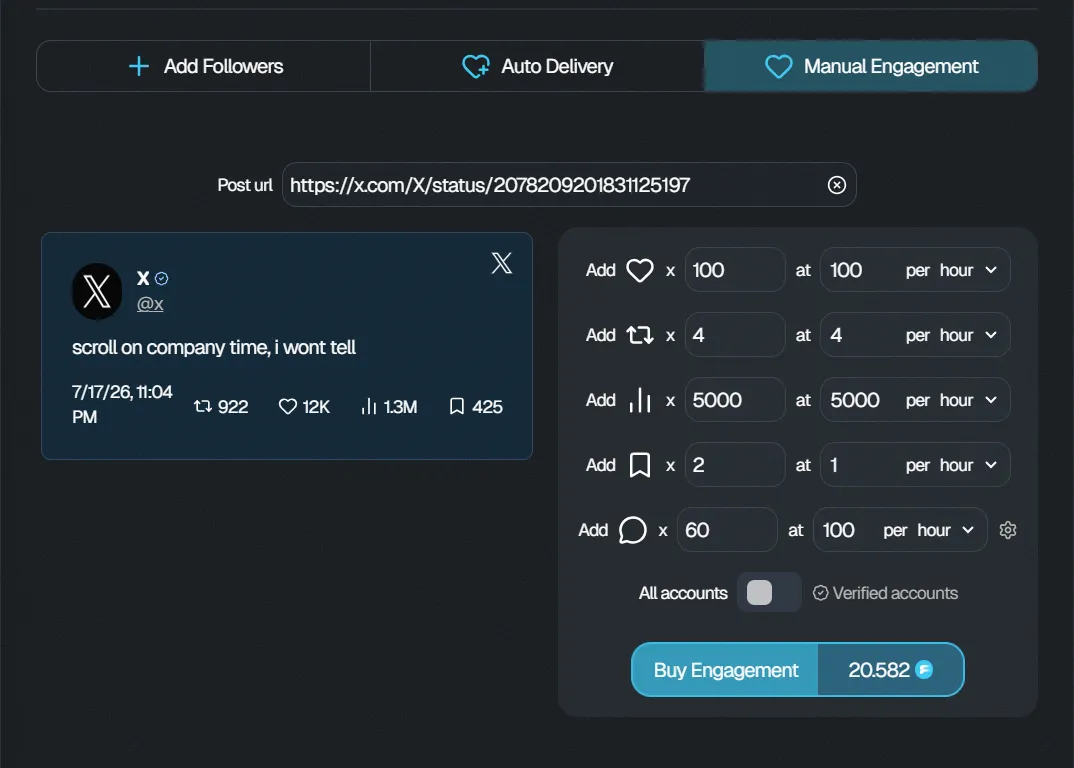
You can select multiple engagement types depending on your needs.
Step 4: Choose the quantities
Section titled “Step 4: Choose the quantities”Enter the amount of engagement you want for each selected option.
The total price will update based on the engagement types and quantities you select.
Step 5: Configure delivery
Section titled “Step 5: Configure delivery”Choose the available delivery settings for your engagement order.
Review the selected quantities and delivery settings before completing your purchase.
Step 6: Review and place your order
Section titled “Step 6: Review and place your order”Before confirming your order, check:
- The X post
- Engagement types
- Quantities
- Delivery settings
- Total price
Once everything is correct, complete your purchase using your available FMAX credits.
Manual Engagement vs Auto-Delivery
Section titled “Manual Engagement vs Auto-Delivery”Use Manual Engagement when you want engagement for one specific X post.
Use Auto-Delivery when you want to configure engagement for future posts from an X account.