
Adding Credits
Before purchasing FMAX services, make sure your account has enough credits to complete the order.
If your balance is insufficient, you can add additional credits to your account.
Step 1: Choose to add credits
Section titled “Step 1: Choose to add credits”From your FMAX account, select the option to add credits.
You may also be prompted to add credits automatically when attempting to place an order without a sufficient balance.
Step 2: Choose an amount
Section titled “Step 2: Choose an amount”Select the amount of credits you want to add.
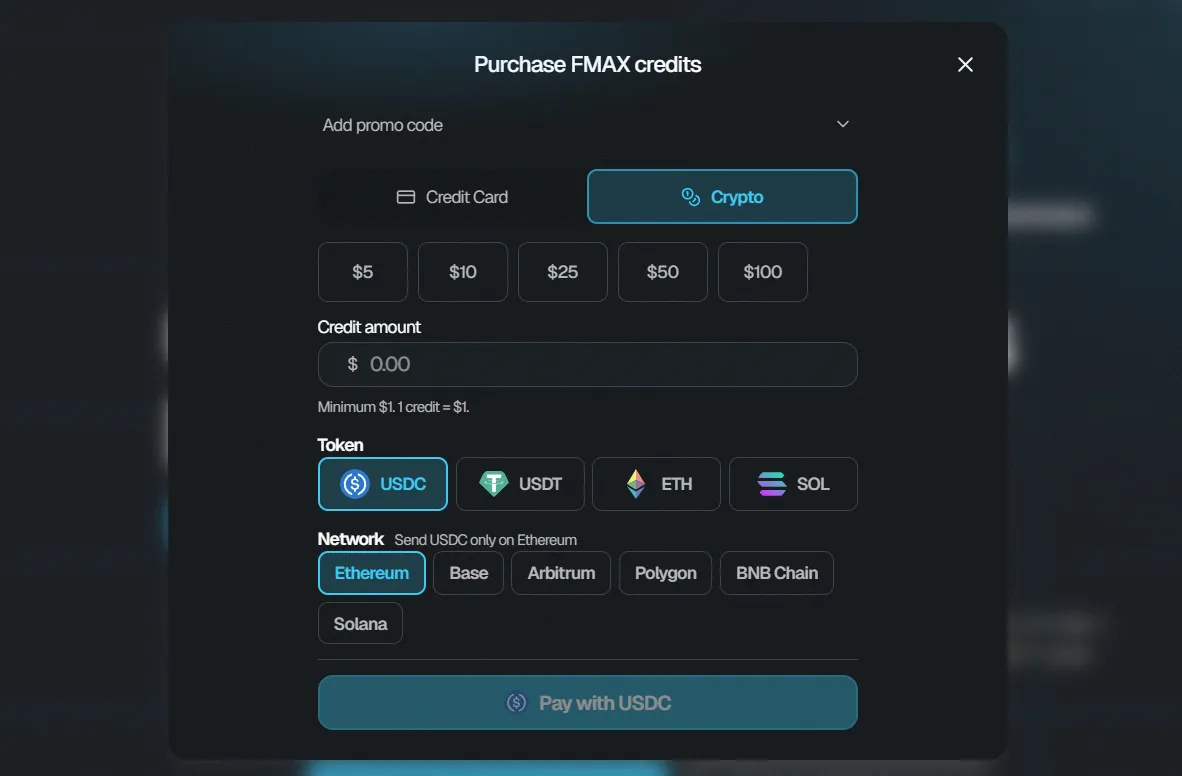
You can choose from the available preset amounts or enter a custom amount when the option is available.
Remember:
$1 = 1 FMAX credit
For example, adding $10 gives you 10 FMAX credits.
Step 3: Choose your payment method
Section titled “Step 3: Choose your payment method”Select one of the available payment methods.
FMAX supports payment options including:
- Credit or debit card
- Crypto
The available options will be displayed during checkout.
Step 4: Review your payment
Section titled “Step 4: Review your payment”Check the amount you are adding and your selected payment method before continuing.
If you have a valid promo code and the option is available, you can apply it before completing the payment.
Step 5: Complete the payment
Section titled “Step 5: Complete the payment”Complete the payment using your selected payment method.
Once the payment has been successfully processed, the credits will be added to your FMAX balance.
Step 6: Check your balance
Section titled “Step 6: Check your balance”After completing the payment, check your account balance to confirm that the credits have been added.
You can then use your available credits to purchase followers or engagement services.