
Replies & Comments
FMAX allows you to include replies and comments as part of your engagement setup.
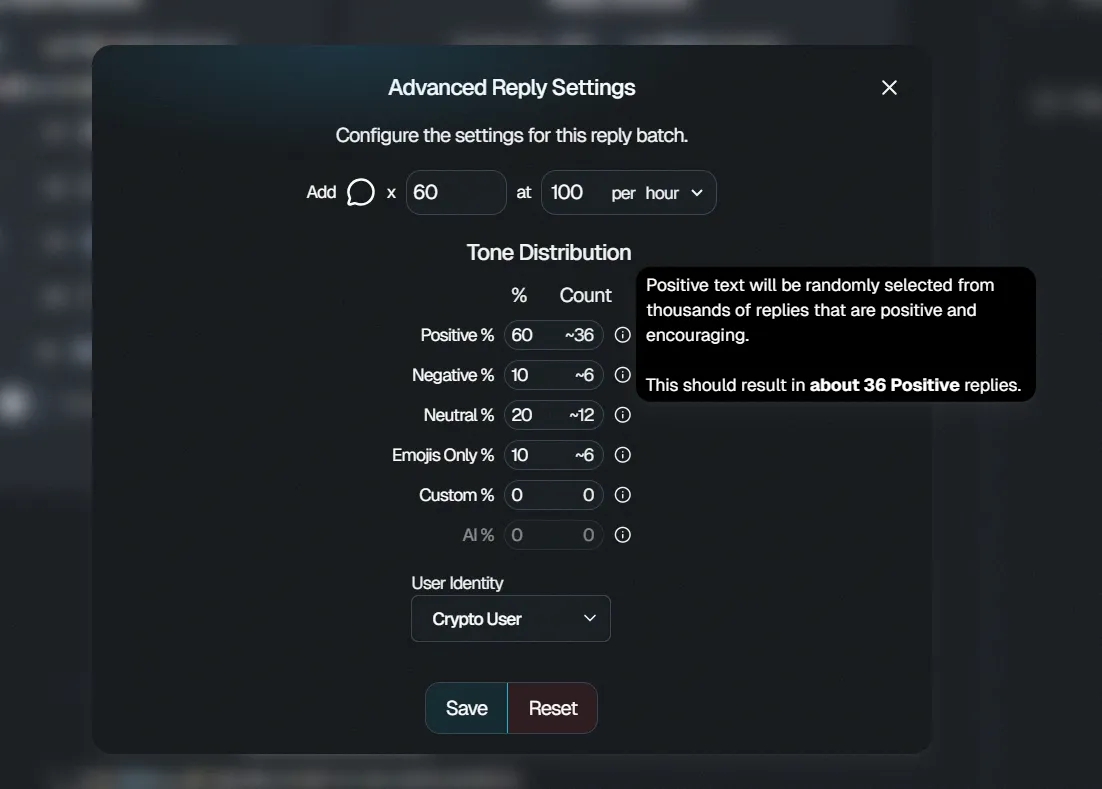
You can configure the type of replies you want when setting up supported engagement campaigns.
Reply options
Section titled “Reply options”Depending on the available campaign settings, reply options can include:
- Positive
- Negative
- Neutral
- Emojis
- Custom replies
These options allow you to choose the type of replies that best matches your campaign.
Configure your replies
Section titled “Configure your replies”When creating an engagement campaign:
- Select Replies as one of your engagement options.
- Choose the number of replies you want.
- Select your preferred reply type.
- Configure any additional available settings.
- Review your selections before saving or placing the order.
Custom replies
Section titled “Custom replies”If the Custom Replies option is available, you can provide your own reply content instead of using one of the predefined reply categories.
Review your custom replies carefully before confirming your campaign.
Using replies with Auto-Delivery
Section titled “Using replies with Auto-Delivery”Replies can be included as part of an Auto-Delivery configuration.
This allows your selected reply settings to be used with eligible future posts according to your campaign configuration.
You can also choose how long the Auto-Delivery campaign remains active.
Using replies with Manual Engagement
Section titled “Using replies with Manual Engagement”If you want replies on one specific X post, use Manual Engagement.
Paste the link to the X post, select replies as an engagement option, configure the quantity and available settings, and review your order before purchasing.
Review before confirming
Section titled “Review before confirming”Before saving or purchasing a campaign that includes replies, confirm:
- The correct X account or post
- Number of replies
- Reply type
- Delivery settings
- Campaign expiration, if applicable
- Total price